Telecom Care – Official Website

A Unit Of TELECOM CARE EDUCATIONAL TRUST | Regd. Under Govt. Of West Bengal

Under Redg. Govt. of West Bengal An ISO 9001:2015, ISO 29990:2010 Certified Training Institute | Govt. Of India, MSME Certified Institute Certificate Registration No - INQ/WB-10667/0522 | QRA ISO Registration No -230422083394QRA | MMS ISO Registration No - 26MEQWR16

Tecno Flash Tool – All version

TECNO_FlashTool_V5.2108.02.9 : Download

Tecno_Flash_Tool_v4.1901.23.17: Download | Mirror

Softwaredownload_V5.1907.04.15_for_AfterSales: Download

AfterSalesTool_V1.5.1_20190627: Download

Tecno_Flash_Tool_v4.1811.23.11: Download

Tecno_Flash_Tool_v4.1808.28.17: Download

Tecno_Flash_Tool_v4.1806.11.11: Download

Tecno_Flash_Tool_v4.1801.03.10: Download  (Work for I3, I5 & I7)

Download Tecno Flash Tool: Download 

Driver: MTK

Tecno Flash tool can be used to flash any Tecno Phone.

SP Flash tool can be used as a substitute to Tecno tool, but in most case scenario it yield out error.

How to use Tecno Flash Tool:

If you are stuck at FRP, Flashing will Remove FRP.

1- Download & Unzip Tecno Flash tool Folder. Run SWD_AfterSales.
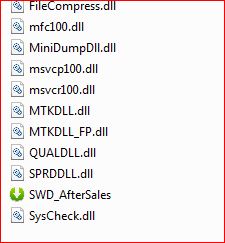
2- It will launch Tecno Flash Tool.

Tecno Flash tool

3- Click on Setting then on Load, Choose Firmware and Click on Confirm.
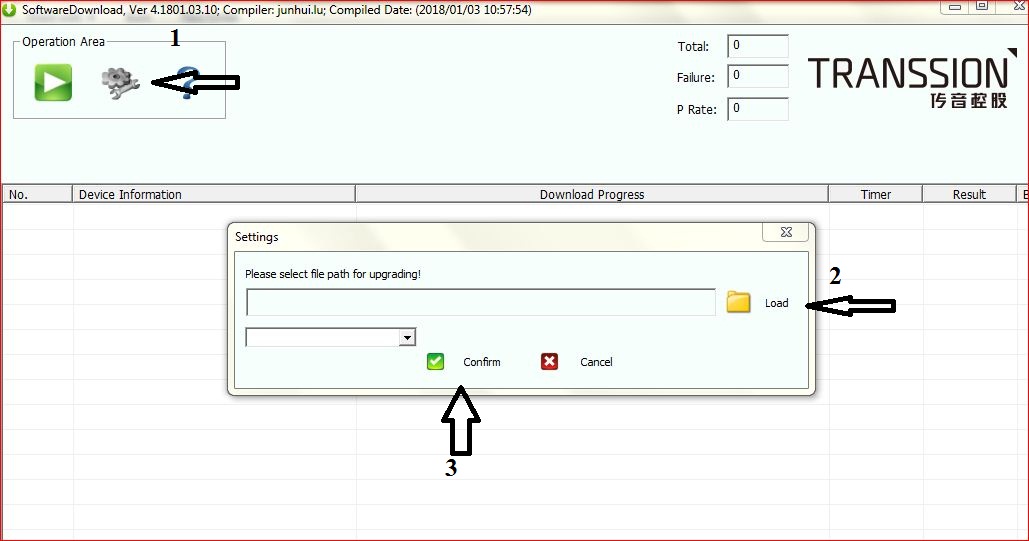
4- Click on Play. Switch off Phone & Connect it by Pressing Both Volume keys.

5- Flashing will Start.

Share:

Leave a Reply

Your email address will not be published. Required fields are marked *

dinamobet - dinamobet giriş - dinamobet güncel giriş
dinamobet
dinamobet - dinamobet giriş - dinamobet güncel giriş
dinamobet
dinamobet
dinamobet
Dinamobet
betasus
meritking
dinamobet
dinamobet
dinamobet
dinamobet
dinamobet
dinamobet
dinamobet
Dinamobet
Dinamobet
Dinamobet
Dinamobet
Dinamobet
Dinamobet
Kulisbet
Kulisbet
Dinamobet
Dinamobet
Kulisbet
Kulisbet
Kulisbet giriş
Kulisbet güncel giriş
mobile technician