TECNO_FlashTool_V5.2108.02.9 : Download
Tecno_Flash_Tool_v4.1901.23.17: Download | Mirror
Softwaredownload_V5.1907.04.15_for_AfterSales: Download
AfterSalesTool_V1.5.1_20190627: Download
Tecno_Flash_Tool_v4.1811.23.11: Download
Tecno_Flash_Tool_v4.1808.28.17: Download
Tecno_Flash_Tool_v4.1806.11.11: Download
Tecno_Flash_Tool_v4.1801.03.10: Download (Work for I3, I5 & I7)
Download Tecno Flash Tool: Download
Driver: MTK
Tecno Flash tool can be used to flash any Tecno Phone.
SP Flash tool can be used as a substitute to Tecno tool, but in most case scenario it yield out error.
How to use Tecno Flash Tool:
If you are stuck at FRP, Flashing will Remove FRP.
1- Download & Unzip Tecno Flash tool Folder. Run SWD_AfterSales.
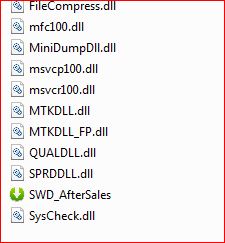
2- It will launch Tecno Flash Tool.

3- Click on Setting then on Load, Choose Firmware and Click on Confirm.
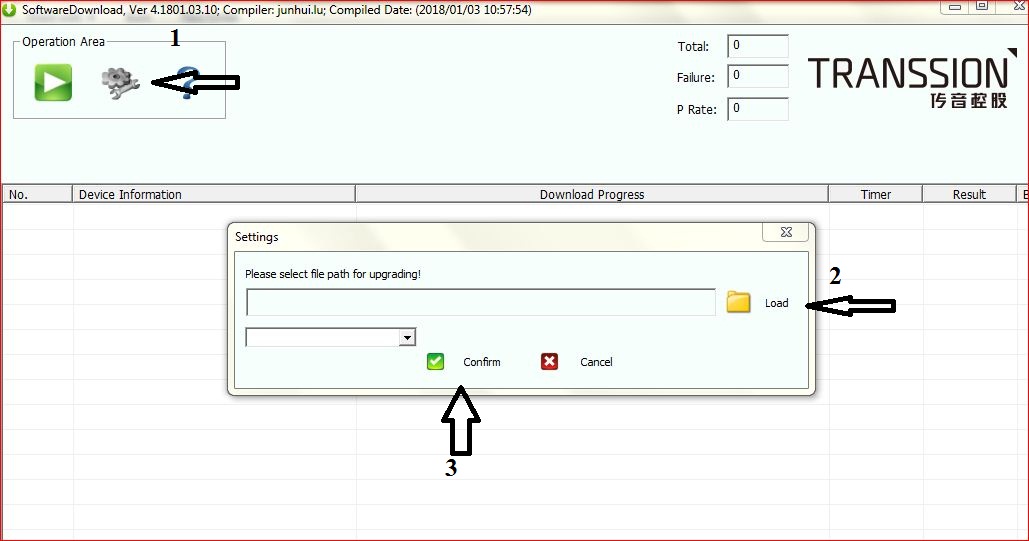
4- Click on Play. Switch off Phone & Connect it by Pressing Both Volume keys.
5- Flashing will Start.